
When I moved this blog off Blogger, I broke every old link to my section pages overnight. Anyone who clicked one landed on a 404. The new site was fine. The old addresses simply pointed at nothing.
A redirect is the fix for that. In this guide I explain what one really is, what the numbers mean, and which tools Cloudflare gives you to build them. It is the first piece of a series, and the hands on tutorials are linked at the end.
So what is a redirect?
It is a reply from the server that says the page moved and hands over the new address. The server answers with a status code that starts with 3, plus a header called Location that carries the new address. Your browser reads it and loads that address right away. You never click anything.
Watch the clip. I open an old address from this blog and the address bar rewrites itself in under a second. A few words in the browser are in Spanish, because that is the language I use every day. The redirect works the same in any language. If you want the raw version, curl shows what the server actually says.
curl -I https://www.loresolvi.com/search/label/EnglishHTTP/1.1 301 Moved Permanently
Location: https://www.loresolvi.com/enTry it yourself, because the browser is the most visual way. Copy www.loresolvi.com/search/label/English, paste it into the address bar and hit Enter. Or click the old English address and watch the bar change on its own.
Permanent or temporary
Every redirect belongs to one of two families. The family matters more to search engines than it does to people.
- A permanent redirect says the old address is retired for good. Crawlers swap the stored address for the new one.
- A temporary redirect says the move is not final. Crawlers keep the old address and do not memorize the new one.
Google’s documentation puts it clearly. With a 301 or a 308, the new address becomes the main one in the index. With a 302, a 303 or a 307, the old page can stay in the search results. So when a move is for good, pick a permanent redirect.
The status codes, decoded
Five numbers cover almost everything you will meet. MDN’s reference explains them well, and this is my short version.
- The 301, Moved Permanently, is the classic for reorganizing a site. A GET stays a GET, but with other methods the browser may turn the request into a GET.
- The 308, Permanent Redirect, is also permanent. It keeps the method and the body exactly as they were.
- The 302, Found, is temporary and has the same method quirk as the 301.
- The 307, Temporary Redirect, is temporary and keeps the method. MDN calls it the better choice over the 302 when the request is not a GET.
- The 303, See Other, always switches to a GET. It is handy after a form submission, so refreshing the page does not send the data twice.
The method only matters when the visit comes from a form. A normal page visit is a GET, while a form usually sends a POST. For ordinary pages a 301 is plenty. If a form has to keep sending a POST, use a 307 or a 308. Cloudflare’s bulk redirects only offer 301, 302, 307 and 308.
Where you will actually use them
Almost everything you do with redirects falls into four cases.
- You want the site to open the same with and without www, so one page does not live at two addresses.
- You change domains and want everyone’s links and bookmarks to keep working.
- You want every visitor on https and nobody on plain http.
- You reorganized the site and need the old links to survive, because you cannot control the links other people publish. That last one is exactly what hit me with Blogger.
The kinds of redirect in Cloudflare
Cloudflare has several tools, and each one covers a different job. They share one requirement. For single and bulk redirects, the DNS record of your domain has to go through Cloudflare, with the orange cloud turned on.
Single redirects, built with a rule
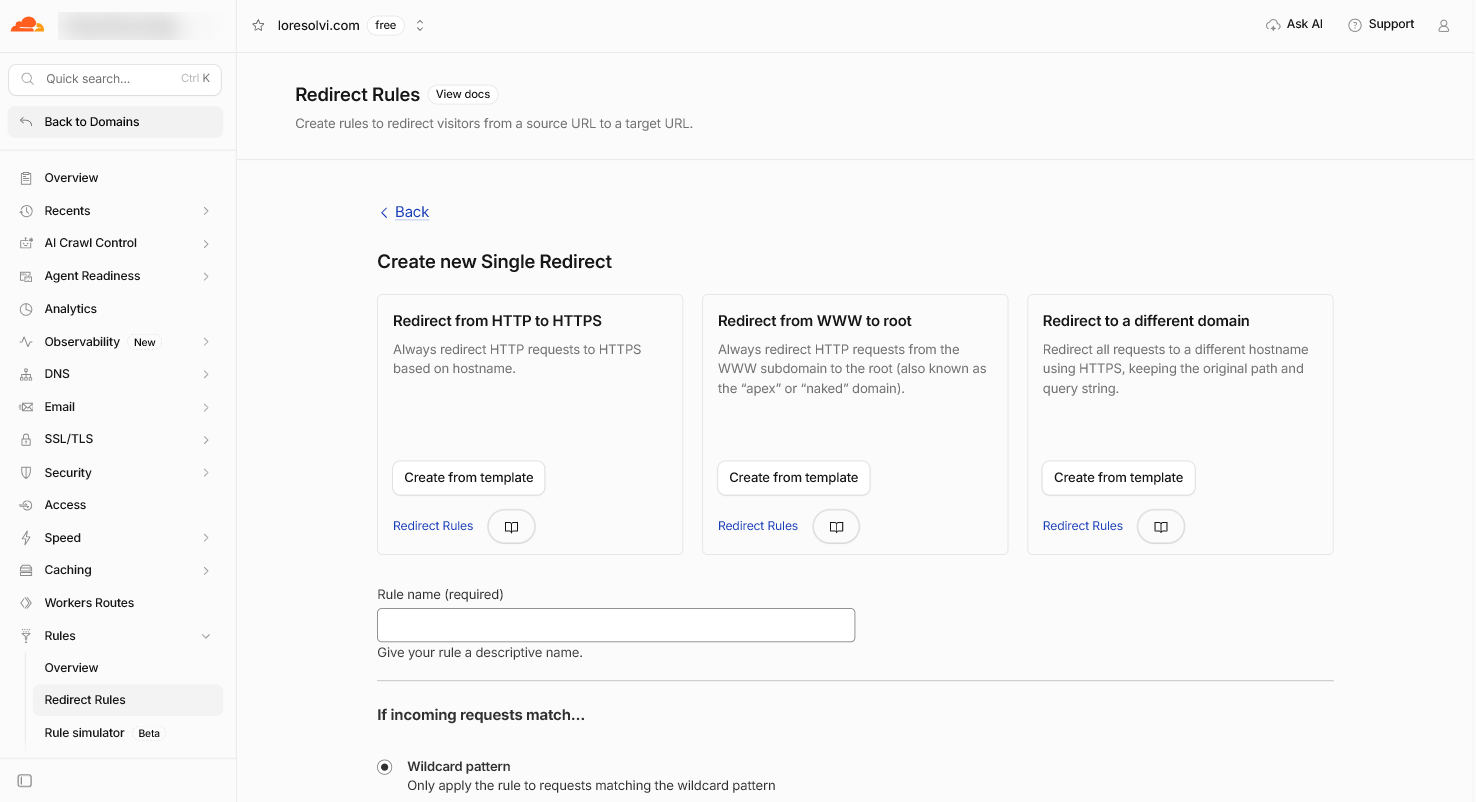
This one works at the level of a zone, which means one domain. It can be static, with a fixed destination, or dynamic, where the destination is built from parts of the original address. The wildcard pattern option can cover thousands of addresses with a single rule, and you do not need regular expressions.
Cloudflare also ships ready made templates. One goes from HTTP to HTTPS, one from WWW to the root, and one to a different domain. Regular expressions exist too, but only on the Business and Enterprise plans. I use a single redirect to send my bare domain to the www version.
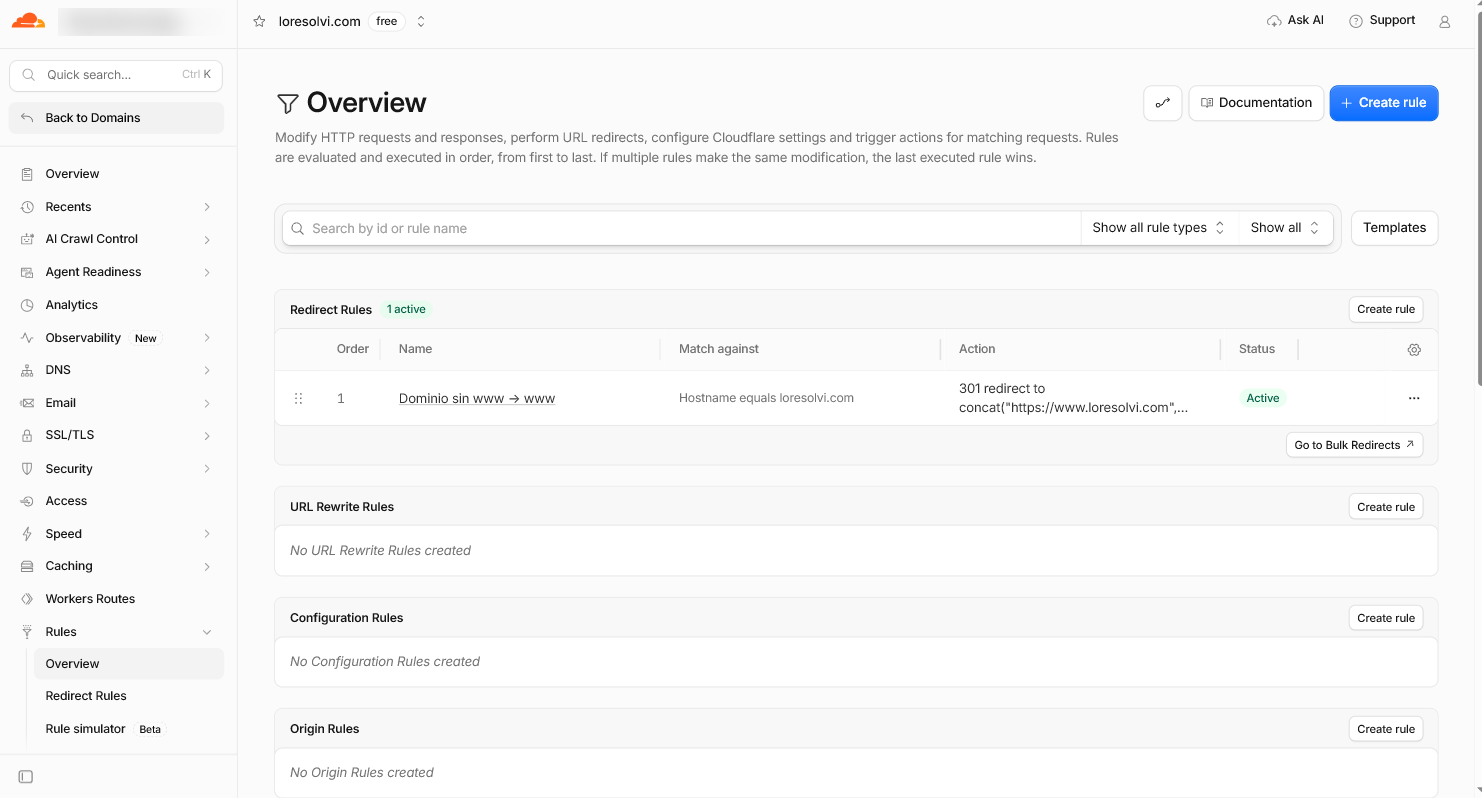
The step by step tutorial is in Spanish for now, with real screenshots.
Bulk redirects
These work at the account level and can apply to every domain you own in Cloudflare. They are meant for a large number of redirects that are mostly static. You write a list of address pairs, and a rule switches that list on. They do not support text replacement or regular expressions, but every redirect has checkboxes that control how addresses are matched and what gets kept.
You can reach them from the Rules overview too, through the Go to Bulk Redirects button. The full tutorial is also in Spanish, and it uses the exact case of my old Blogger links.
From HTTP to HTTPS
This is the most common redirect on the web. Anyone who arrives on http gets sent to the secure https version. Cloudflare offers it as a template inside single redirects, and also as a setting that forces HTTPS across the whole domain. I have that setting on.
Snippets
For logic the two tools above cannot express, Cloudflare offers Snippets, which are short pieces of JavaScript. They are an advanced option, and I do not cover them in this series.
How to choose
The decision comes down to how many addresses you have and whether they follow a pattern.
- If the whole domain follows one logic, like sending the bare domain to www, use a single redirect with a rule.
- If you have loose addresses with no pattern between them, use a bulk redirect list.
- If all you want is for nobody to arrive without the padlock, use the HTTP to HTTPS template or the setting.
- If the logic is complicated and the other tools cannot say it, use a Snippet.
Mistakes that bite
Bad redirects show up fast, and the same few mistakes keep repeating.
- A loop happens when one redirect leads to another that sends you back to the first. Browsers detect it and show a redirect loop error. MDN warns that loops completely break the experience for the visitor.
- A chain of redirects, one after another, adds an extra request every time. MDN suggests keeping them to a minimum and fixing your own internal links instead of redirecting them.
- A temporary redirect used for a permanent move tells Google the old address can stay in the results.
- A JavaScript redirect is the last resort. Google says to use it only when you cannot do it from the server or with a meta refresh.
- With the gray cloud in Cloudflare, the visit never goes through Cloudflare and the rule never runs.
When you test, use a private window. Browsers remember 301s and can show you an old result.
Frequently asked questions
Should I use a 301 or a 302?
Use a 301 when the change is final and a 302 when it is temporary. If the address is gone for good, the 301 is the right call, because it tells search engines to update their index.
Does a redirect hurt SEO?
Done properly, it keeps the move clean. Google explains that the old names fade out of the results on their own without you doing anything. It can take a while to show up.
How long should I keep a redirect?
Google’s guide does not give a time limit. I keep mine for as long as old links to that address exist, because removing the redirect brings the 404 right back.
Can I redirect an address that is not in my Cloudflare account?
No. Cloudflare only sees the traffic that passes through it. A blog on blogspot.com is served by Blogger, so that redirect has to be set up in Blogger.
Where to go next
This series has two tutorials for now, and both are in Spanish. Pick the one that matches your case.
- How to make a 301 redirect with a rule in Cloudflare, in Spanish
- How to make bulk redirects in Cloudflare, in Spanish
Sources
I checked the official documentation on November 3, 2026.
Comments
Write a comment